Many web designers, developers, SEO specialists, and similar professionals use different methods to find website clients. Some may use Yellow Pages, startup directories, Facebook, Instagram, or even Google Maps to find (local) web design leads or to find companies without websites. While those methods may work, they often involve a lot of manual effort. Many would prefer a direct list of leads right in front of them, with useful features included. This is where Webleadr shines! It is a platform designed for professionals to easily fetch web design leads from any location they choose, whether locally or elsewhere. Let’s now explore how to get clients for web development or web design business using this platform.
Finding/scanning businesses
- Purchase credits
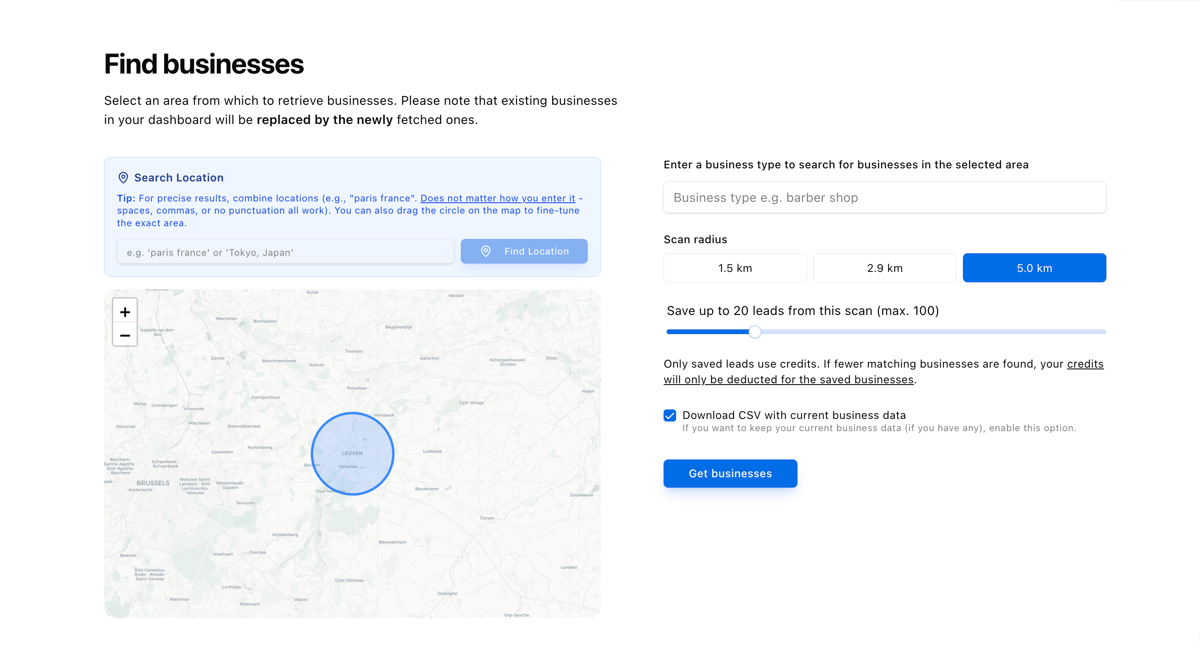
- Go to the 'Find Businesses' page and select an area on the world map from which you want to scan businesses.
- Choose which type of businesses you would like to fetch e.g. dentists.
- Select the maximum number of businesses you would like to fetch from the selected area on the world map and choose the scan radius.
You can also type any location directly into the search input field, whether it is a city or a country. The system is smart enough to recognize the location you enter, and by simply pressing Enter, the map automatically zooms in on that spot. You can also drag the circle on the map to fine-tune your exact search area.
The dashboard
After clicking on 'Get businesses', you will be directed to the dashboard, where you will find a list of companies at your disposal. By default, the 'Best leads first' tab is selected, so you immediately see a list of companies without websites, then businesses using third-party websites e.g. Facebook Page, and so forth. This is where you start by calling each of them with just one click on a green button, sending them a mail (in case their email address is mentioned somewhere on the internet) or contacting them by social media links that is included in the dashboard. It's that simple. Of course, the dashboard offers more than this. For example, it is also bundled with a smart feature that detects businesses using third-party, non-dedicated websites, such as social media profiles or booking service platforms, as their 'main website'.
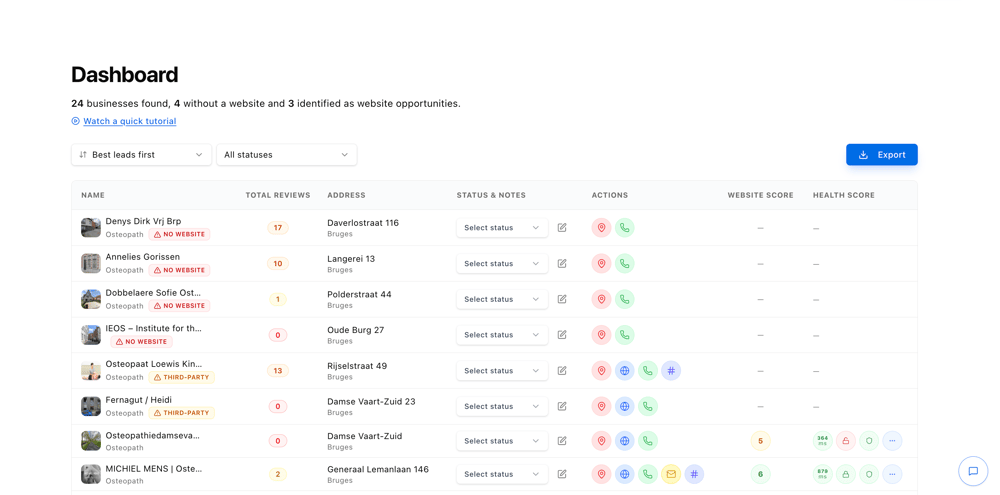
On the list of businesses without websites, you can also check their business name on Google Search with just one click of a button, in case you want to investigate their company further.
Smart Outreach Messages
One of the standout features on the dashboard is the smart outreach message generator. It acts as your personal sales assistant, crafting personalized messages for each lead based on the business type, business name, and the details or lack of details on their current website. The system identifies sections that are missing from their website that could benefit them based on their type of business. If a business doesn't have a website at all, the system drafts a message highlighting the need for one. The outreach language is automatically detected from the business location, or you can pick from over 50 languages. You can also set your own role, such as Web Designer or Freelancer, so the message sounds like it comes from a real person. Once generated, you can copy the message or send an email with just one click.
Social Media Links
Webleadr automatically retrieves social media profiles related to each business, including Facebook, Instagram, and TikTok. This gives you additional channels to reach out and connect with potential clients directly.
Website Health and Design Scoring
Every business with a website gets evaluated in two ways. A Website Health Score grades the site from A to F, covering speed, accessibility, SEO basics, and technical issues, so you know exactly which leads need the most help. A Design Quality Score uses smart visual analysis to rate the website's visual polish and content completeness on a 1 to 10 scale, giving you a clear picture of how professional each site looks.
More Dashboard Features
You can add custom notes and assign status labels with your own colors to each lead, keeping your outreach pipeline organized. Business data can be exported in multiple formats, including CSV, Excel, PDF, and JSON, for seamless integration into your CRM.
Next steps
If you want a practical starting point, begin by targeting local businesses that do not have a website yet. We explain the full process in our guide to finding web design clients, and we cover more discovery methods in our guide to finding businesses without websites.
Conclusion
Webleadr provides you with a list of businesses without websites with just a couple of clicks. The only thing expected from you is your skill in sales or simply convincing people that having a website for their company is always worth the investment. I believe that sales is a soft, yet extremely valuable skill that every professional should strive to master. No application can take care of that for you. Clear communication is something everyone should possess. The role of this platform is to provide you with web design (or any other related niche) leads in the most efficient and easiest way possible, eliminating the hassle of manually finding leads the hard way.
There is also a video demo available on YouTube to visually see how Webleadr works.
So whether you’re a freelancer or a digital agency, Webleadr is designed to streamline your client acquisition process and help you grow your web design, SEO, or agency services.
Contact
Do you have any questions or would you like to request a free quote for a website, logo, or anything else? Feel free to contact me, and I'll be happy to assist you.